Reservation financials panel
Open a conversation in the Inbox. The panel on the right shows the booking, and near its bottom is the FINANCIALS block. It shows what the guest paid, what goes to the booking channel and what is left for you.
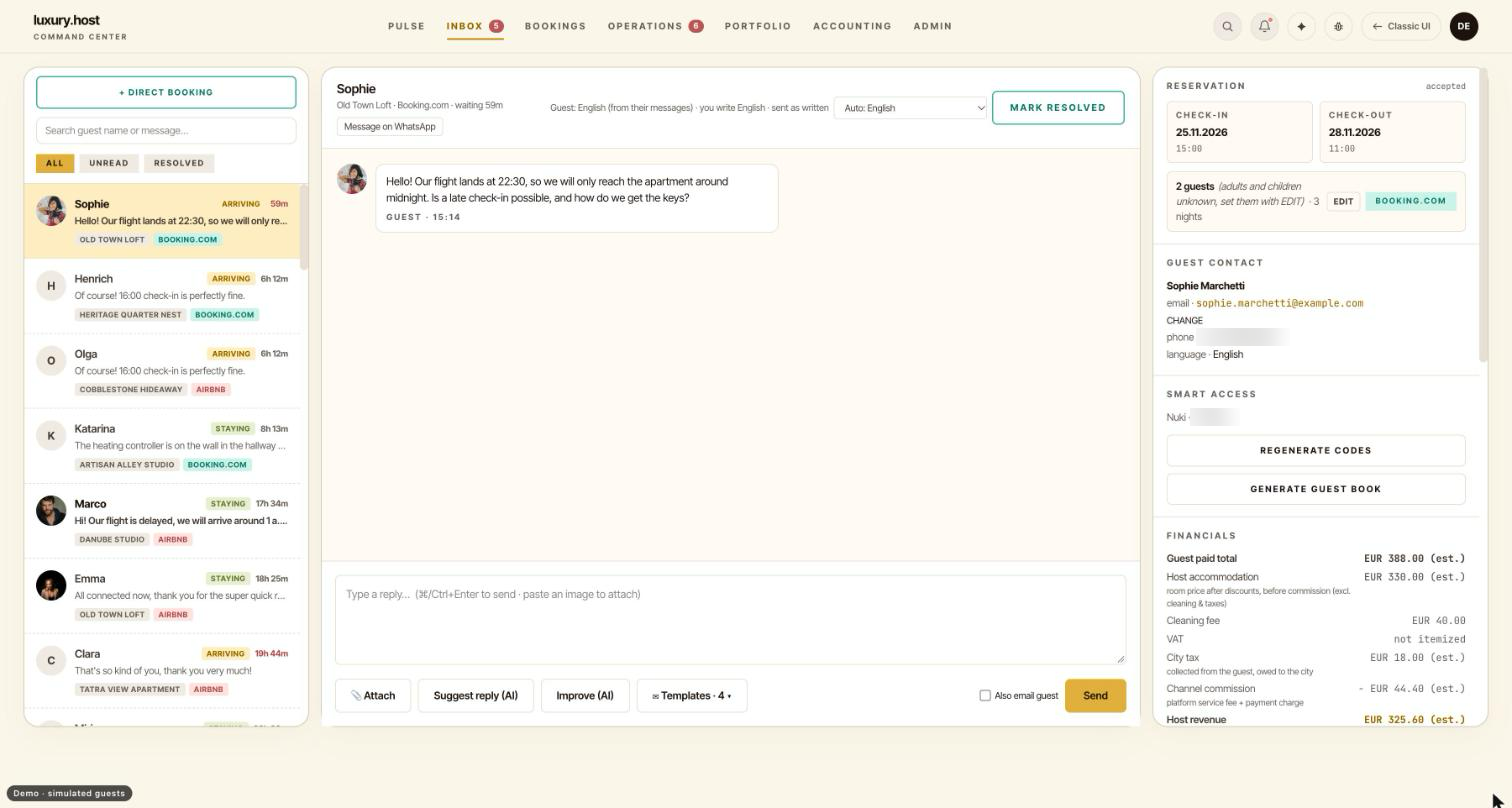
The rows
| Row | What it shows |
|---|---|
| Guest paid total | Everything the guest paid for this booking |
| Host accommodation | The room price after discounts, before commission. Cleaning and taxes are not in it |
| Cleaning fee | The cleaning charge for the stay |
| VAT | The VAT on the booking |
| City tax | The city tax. The small line under it says who pays it to the city: you, or the booking channel |
| Channel commission | What the booking channel keeps: its service fee plus the fee for handling the guest's payment. Shown with a minus |
| Host revenue | Host accommodation plus the cleaning fee, minus the channel commission. City tax is not in it |
| Avg nightly rate | Host accommodation divided by the number of nights |
| Discount % | How the nightly price you got compares with your base price. Only shown when you set a base price |
Other fees or taxes that the channel lists get a row of their own, under the name the channel uses.
Channel commission only appears when the channel takes one. A direct booking has none.
What "(est.)" and "not itemized" mean
- (est.) after an amount: the channel did not send this number, so the app worked it out from your property settings.
- not itemized: the channel did not split this amount out. It is not zero, it is just unknown.
Extra lists under the rows
- HOST FEES: each fee the channel charged you, one per line.
- GUEST DISCOUNTS: discounts the guest got, with the channel's own wording (for example a promotion discount). If you see no such list, the booking had no discount.
Example
Sophie books Old Town Loft on Booking.com for 3 nights.
| Row | Amount |
|---|---|
| Guest paid total | EUR 388.00 |
| Host accommodation | EUR 330.00 |
| Cleaning fee | EUR 40.00 |
| VAT | not itemized |
| City tax | EUR 18.00 |
| Channel commission | − EUR 44.40 |
| Host revenue | EUR 325.60 |
| Avg nightly rate | EUR 110.00 |
The guest total adds up: 330 + 40 + 18 = 388. VAT shows "not itemized" because the channel did not send it as a separate amount; any VAT is already inside these amounts. Your revenue is 330 + 40 − 44.40 = 325.60, without the city tax, because that money belongs to the city.
Cancelled bookings
When a booking was cancelled, the block starts with Cancelled, then Booked price (what the stay cost before it was cancelled) and Paid (what the guest actually paid).
Several bookings in one conversation
When a guest has two or more bookings back to back, the block shows the money for each booking and a Stay total for all of them.
Guest count
At the top of the panel, the RESERVATION block shows how many guests are staying, for example "3 guests (2 adults · 1 child)". Infants and pets are added when there are any.
If the channel did not say how many are adults and how many are children, it reads "adults and children unknown". Click EDIT and enter the ADULTS and CHILDREN. City tax is worked out from this total, so fix it when it is wrong.
Guest book buttons
The guest book buttons are in the SMART ACCESS block of the same panel:
- GENERATE GUEST BOOK: builds the guest's personal welcome page. Once it exists, the button reads REGENERATE GUEST BOOK. Use it after you change the property content, so the guest's link shows the new content.
- OPEN GUEST BOOK ↗: opens the guest's welcome page in a new tab.