Mobile app
Pulse (Today) on mobile
The Pulse tab is the phone version of the Pulse dashboard. Same data, phone layout.
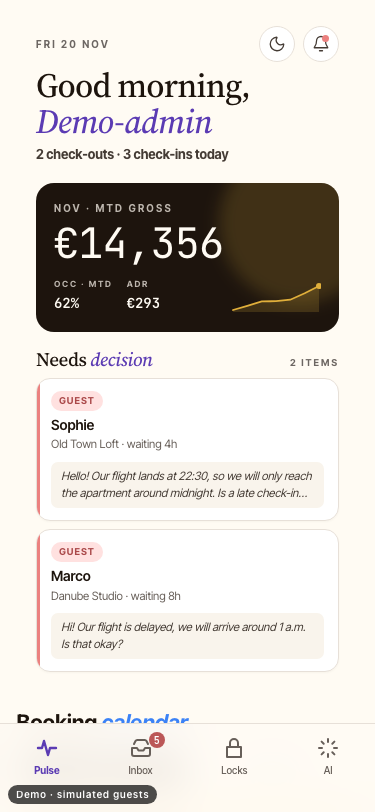
What's on the screen
From top to bottom:
- Header: "Today" and the date (e.g. "Thu, May 28").
- Auto-resolves: tasks that will run today. Each card shows the time (e.g. "19:00 · Send checkout message").
- Unanswered: guest conversations with at least one message nobody (you or the AI) has answered yet. Tap a row to open the conversation in the Inbox tab.
- Booking calendar: 7 days of free and booked nights per property. Swipe sideways for the next week.
- Per-property panel: the same property status panel as on the computer, stacked in one column instead of a 4-column grid.
How it differs from the computer
- The "Per-property" panel is below Unanswered and the calendar, because on a phone you check the calendar most often.
- Auto-resolve cards always show the time at the top. A ⚠ warning shows when something still needs you before the task can run (e.g. "thread has unanswered guest message").
- On the phone you swipe through the calendar instead of seeing the full grid. Tap a date to see what's booked.
What a tap opens
- An auto-resolve card opens the same task panel as on the computer. From there you can dismiss it, resolve it, or open the linked conversation.
- An Unanswered row opens the guest conversation in the Inbox tab.
- A booked date opens the reservation. A free date shows the free-night details.
Source: the luxury.host operator manual.