Properties
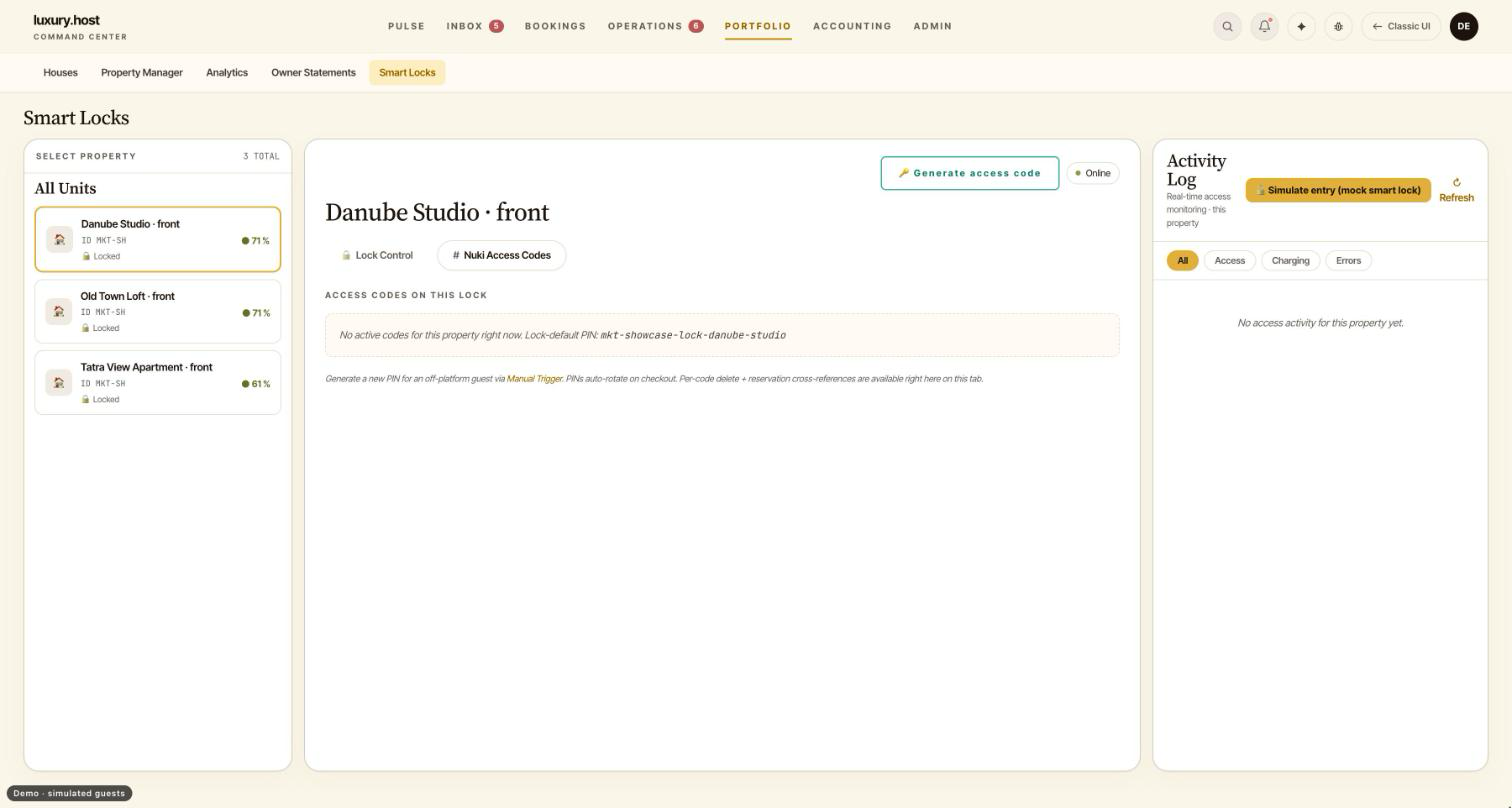
Smart Locks (Nuki)
The app works with Nuki smart locks. It makes a door code (PIN) for each guest stay, and a lasting code for each teammate.
How it works
Door code for each guest stay
- A booking arrives from Hospitable.
- The Generate access code task runs (usually a few hours before check-in; you can change the timing in the task template).
- The app asks Nuki for a new PIN that works only during the guest's stay (from check-in day 00:00 to check-out day 23:59 by default).
- The PIN is saved on the guest of that booking.
- When the Send Check-in task runs, it puts the PIN into the message to the guest with the placeholder
{{guest.nukiAccessCode}}.
Lasting code for each teammate
Each teammate (host, cleaner) has a persistent Nuki PIN. It works as long as they have their role. See Team & Access → Access Codes.
The Smart Lock page
This page shows the current state of a property's lock:
- Active codes: every PIN that works on the lock right now, who has it (guest name and booking, or teammate name and role) and when it ends.
- Recent activity log: every lock action in the last N days (PIN typed, lock opened from the app, code added or removed).
- Manual code panel: make a one-time code (for example for a repair visit) and remove it later.
Common tasks
Add a code for a repair visit
- Open the property's Smart Lock page.
- Click Add manual code.
- Enter the person's name, from when to when the code works, and (if you want) your own PIN.
- Save. The PIN shows in Active codes at once and works on the lock within a minute.
Remove a code
In Active codes, click Revoke on the row. The PIN is removed from the lock within ~1 minute.
⚠ If you remove a teammate's lasting code on this page, the teammate's profile still shows the old code. To remove it cleanly, do it in the Team & Account editor instead: it removes the code from Nuki and updates the teammate too.
A guest says the PIN doesn't work
Check these, most likely first:
- The guest got the wrong code. Sometimes a booking has more than one guest record, and the message used a different one than the code was saved on. Open Smart Lock → Active codes for the booking. If a PIN is there, the guest simply got the wrong one: send the check-in message again.
- PIN not yet active. A Nuki PIN works only between its start and end time. If the guest is early, the lock says no.
- PIN was revoked. Check the activity log.
- Lock offline. The Nuki Bridge lost WiFi. The lock still accepts codes it already knows, but can't get new codes until it is back online.
Limits
- 6-digit PINs only: a Nuki rule.
- Max ~200 active codes per lock: remove old codes now and then. The app removes expired guest PINs by itself every night.
Source: the luxury.host operator manual.